Help
Get out more
If you'd like a hand getting out regularly, pick a plan: a few walks or runs a week, set out for you over a few weeks. Every session still adds to the million.
Pick one
On your profile, tap Get out more. There are walking plans (Walk more, Walk a 10k) and running ones (First 5k, 5k faster, First 10k, Half marathon), each saying who it's for.
- Choose the days that suit you, and the day for the longer walk or run.
- Start this week, or on Monday for a fresh week.
- Some plans can count back from a race date.
- Running plans can take a recent 5k time, so each part of a session has a target pace.
Doing a session
On one of your plan days, Start an activity offers Today's run (or walk) first. You can also tap the day on the This week card on Home.
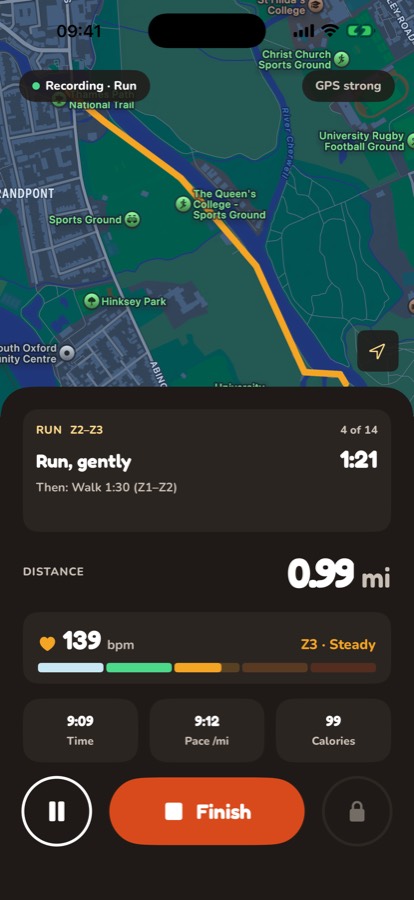
While you're out, the top of the screen shows what to do now, its heart rate zone or target pace, how long is left and what's next. Underneath, a coloured bar shows the whole session, each part in the colour of its zone, and fills up as you go.
Before each change, a voice counts you in (three, two, one) and then tells you what's next, and your Apple Watch taps your wrist. It also tells you when you're halfway. If your heart rate stays out of the zone for a while, you get a nudge.
Choose a male or female voice in Settings, under Plan voice, or turn it off for soft beeps in your headphones instead. The voice comes through whichever device your headphones are connected to. If you start on your watch with headphones on your iPhone, your iPhone does the talking.
Your week
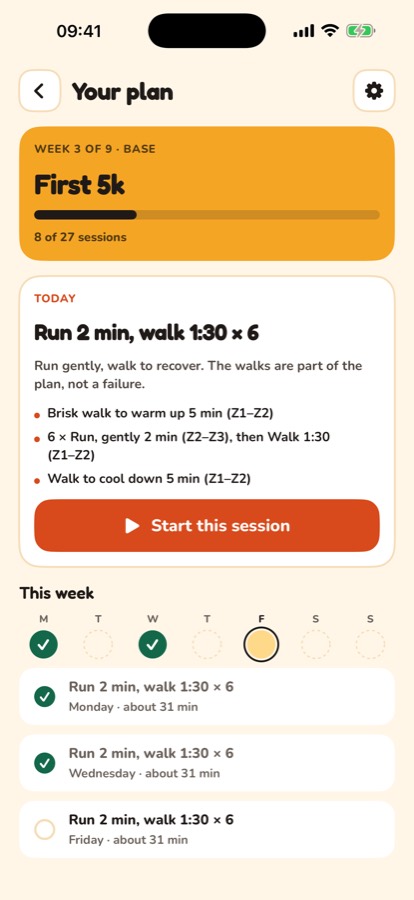
The dots on Home and on your plan show the week: green for done, yellow for still to do. A session not done on its day is missed, shown with a cross, and the plan moves on to the next one. Missed one? On a day with no session of its own, you can catch up: it's offered first when you start an activity, on your iPhone or Apple Watch, until the week ends.
Once the week's sessions are done, Home and your plan say so. Next week's first session shows from Monday.
On your plan, swipe the week (or use the arrows) to look back at earlier weeks or ahead to the ones coming. Tap a session to see its steps.
Changing things
Open your plan and tap the gear. You can change your days, the 5k time, pause the plan or end it. When you resume after a pause, the plan moves on by the weeks you were away, so nothing comes back as missed.
Without an Apple Watch
Plans work on your iPhone on its own. Each step says how hard to go ("Run, gently", "Brisk walk"), and a recent 5k time adds a target pace to each part of a running session.
If something hurts
Take a few days off, then go gently. If it's sharp, or still there after a week, see a physio or your GP before carrying on. New to exercise, or have a health condition? Check with your doctor before you start.
The plans are built on established training principles: building up gradually, mostly at a pace where you can still talk, with lighter weeks along the way.
Still stuck? Get in touch and tell us what you were doing. Screenshots help.