Help
Challenges
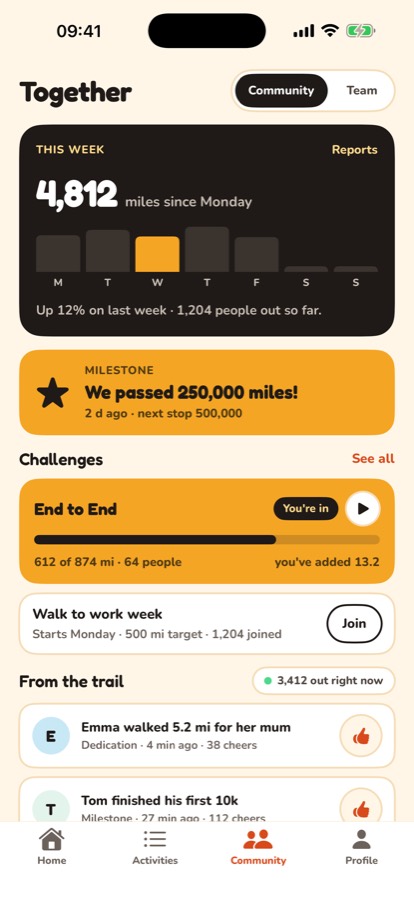
A challenge is a target everyone in it works towards together, like walking and running the length of Britain between you. Find them on the Community tab, and tap Join on one you like.
Once you've joined, your walks and runs can count towards it. Every mile still counts towards the million as well.
Start an activity for a challenge
- On the Community tab, tap the play button on the challenge's card.
- Or open the challenge and tap Start an activity for this.
Either way, the walk or run counts towards that challenge when you save it.
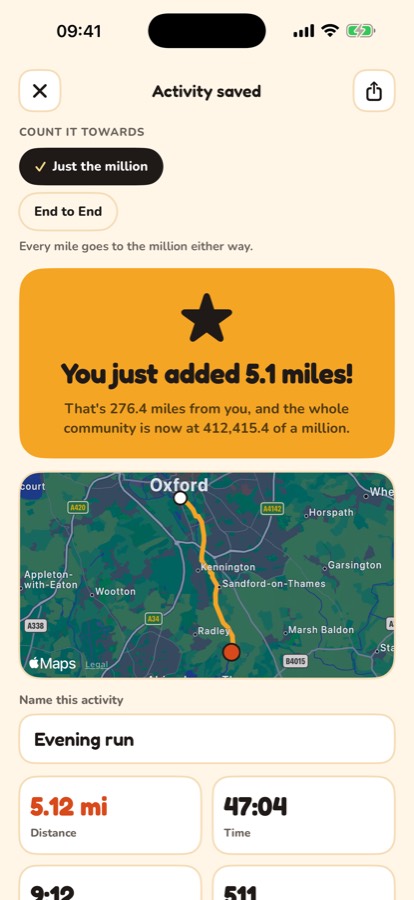
Pick a challenge when you save
If you started from Start an activity on Home, you can still choose. When you save, pick the challenge under Count it towards, or leave it on Just the million.
On your Apple Watch
- Start from one of your challenges on the watch's first screen.
- Or pick one under Count it towards on the screen after you finish.
Chat and Activity
Each challenge has two tabs. Chat is for talking to everyone in it. Activity shows the walks and runs of the people in it, newest first, and you can cheer any of them.
Change it later
Open the walk or run from Activities and choose a different challenge under Count it towards, or Just the million to take it out of the challenge. A walk or run can only count towards a challenge that was running on the day you did it.
Still stuck? Get in touch and tell us what you were doing. Screenshots help.